
Introduction to Fussion Middleware

Main purpose of this writing is to give you a little bit introduction to Fussion Middleware
Oracle Fusion Middleware is a collection of leading, standards-based software products. Which span a range of tools and services from Java EE and developer tools, to integration services,business intelligence, collaboration, and content management.
The Fusion Middleware’s  architecture enables you to “drop and deploy” various Oracle Fusion Middleware products into your existing IT environments as shown in the diagram.
Oracle Fusion Middleware’s modular approach also enables organizations to extend the value of existing middleware technologies and business applications from other software vendors like Microsoft, IBM, SAP.
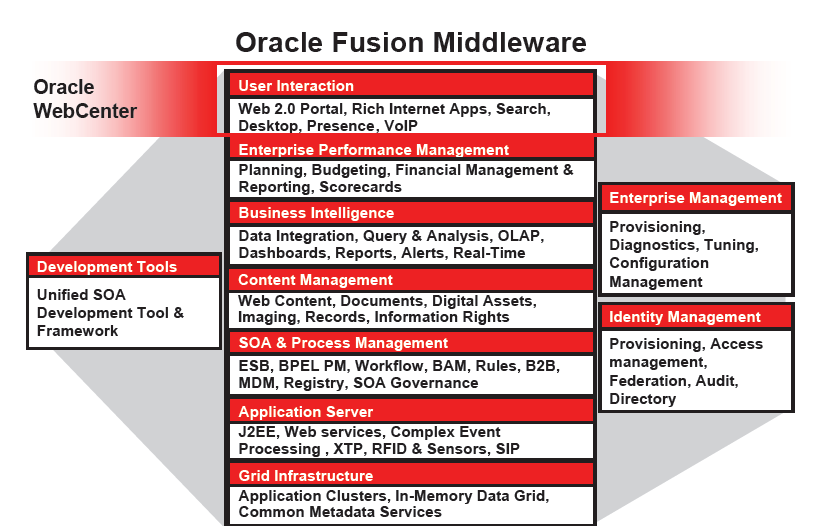


Oracle WebLogic Server is the core, service-oriented architecture platform that underlies the Oracle Fusion Middleware components.The stack includes business processes, process management, content management, and business intelligence and enterprise performance management capabilities.
On top of all these components is a user interaction layer that brings together the tools and the services on the stack. This user interaction layer is nothing but Oracle WebCenter.

Continue reading Oracle WebCenter.......


Comments

Popular posts from this blog

Oracle ADF Interview questions

Why ADF ?     Oracle ADF (Application Development Framework) is state of the art technology to rapidly build enterprise application. ADF is a mature J2EE development framework and many other products under Oracle Fusion Middleware stack are build upon ADF 11g. ADF provides variety of inbuilt components that minimizes the need to write code allowing users to focus more on features and business aspects of the application. With WebCenter and SOA plugins, we can also integrate WebCenter Services and SOA into your application making it rich and extensible. Explain about JSF lifecycle ? The six phases of the JSF application lifecycle are as follows (note the event processing at each phase): -Restore view -Apply request values; process events -Process validations; process events -Update model values; process events -Invoke application; process events -Render response Immediate=true : A command button that does not provide ...

The file store "WLS_DIAGNOSTICS" could not be opened

WLS_DIAGNOSTIC ERROR weblogic.store.PersistentStoreException: [Store:280073]The file store "WLS_DIAGNOSTICS" could not be opened because it contained a file with the invalid version 1. A file of version 2 was expected. When you get this error while running your application on internal weblogic server delete the following file WLS_DIAGNOSTICS000000.DAT search the file in following path C:\jdev_work\system11.1.1.5.37.60.13\DefaultDomain this file is in DefaultDomain folder of your jdev. and delete the WLS_DIAGNOSTICS000000.DAT file . and run your applicatuon

Overview Editor for bc4j.xcfg

This is used to customize the configuration settings for the application pool, connection pool, and transactions. Select the Application Module, then select a configuration from the Configurations list. You can specify a Default Configuration from the dropdown to use with selected application module. Edit the name of the configuration in Details. Its having 3 tabs 1.Database and Scalability 2. Properties 3. Custom Properties Database and Scalability Tab : In Database and Scalability you can mention the JDBC data source definition for each application module. You can choose to connect to a JDBC data source or to a JDBC URL.The default connection type is the default data source. A data source is a vendor-independent encapsulation of a database server connection on the application server. 1. Data sources ( JNDI name) offer advantages over a JDBC URL connection because the data source can be tuned, reconfigured, or remapped without changing the deployed application. 2. JDB...